
Answer Engine Optimization is the work of making a page’s content extractable — readable by a system that is going to pull one passage out of it and use that passage to answer a question, usually without sending anyone to the page. It sits downstream of crawl access and upstream of citation, and it is the part of AI search where cause and effect are close enough together that you can actually work on them.
That last point is why this guide exists. Most writing about AI search is about the parts you don’t control: whether an assistant mentions you, how often, in which of six products, measured by tools that disagree with each other. Answer-readiness is different. Whether a section’s first sentence answers its own heading is a fact about your HTML. You can check it this afternoon, change it, and check it again.
That also makes it the only part of this subject you can put in a plan. “We will improve our AI visibility” is not a commitment anyone can hold you to, and the numbers offered to support it move between runs. “Four hundred pages have no direct answer under their main heading; here is the count, here it is again after the fix” is a before-and-after with a date on it. It does not promise a citation, and it should not — but it is the half of the problem that behaves like work.
What follows is the whole page-level layer: what AEO actually optimizes for, the eight signals answer-readiness turns on, and for each one, the check you can do by hand plus the check that survives a site with forty thousand URLs.
Key Takeaways
- AEO is about extraction, not ranking and not citation: whether a machine can lift a clean, correct passage out of your page. That’s a property of your HTML you can verify directly.
- No new file format or markup is required. Google states a page needs only to be indexed and eligible for a snippet, with no additional technical requirements and no special structured data (Google Search Central, retrieved 2026-07-30).
- The highest-value fix on most pages is the answer block: the answer stated in the first sentence under the heading that asks for it.
- Answer-readiness is necessary, not sufficient. A page can be perfectly extractable and never cited. Fix the deterministic half first because you can.
What answer engine optimization actually optimizes for
AEO optimizes for one event: a machine reading your page, deciding a specific passage answers a specific question, and lifting it. Its unit is not the page — it’s the passage. A search engine ranks a link and a generative engine synthesizes a paragraph from several sources; SEO, AEO, and GEO: what actually changed works through why a page can do well on one and badly on another.
The useful thing to know about extraction is how little of your page it keeps: it strips boilerplate, keeps one block, splits it into chunks, and evaluates chunks against a question — the pipeline what an answer engine reads walks in detail. Every signal below is about whether a chunk survives that trip intact and says something on its own.
Two misconceptions send people to work on the wrong thing.
AEO is not a markup format. There is no answer-engine schema to install and no file to publish at your root. Google’s guidance is explicit: “You don’t need to create new machine readable files, AI text files, or markup to appear in these features. There’s also no special schema.org structured data that you need to add” (Google Search Central, retrieved 2026-07-30). The eligibility rule is ordinary — a page must be indexed and eligible to be shown in Google Search with a snippet, and “there are no additional technical requirements.”
AEO is not a rebrand of SEO, or a replacement for it. The same page states that “while specific optimization isn’t required for AI Overviews and AI Mode, all existing SEO fundamentals continue to be worthwhile.” This is an additional layer on a foundation that is still load-bearing. A page that isn’t indexed, or that a crawler can’t reach, has nothing for this guide to help with — that gate is AI crawler access, and it comes first.
The eight things a page’s answer-readiness turns on
Eight page-level properties decide whether a passage can be lifted from your page: the answer block, headings, Q&A structure, extractability, schema, lists and tables, title and meta, and sentence length. Nobody who runs an answer engine publishes a scorecard for these, so any model of them is somebody’s model. Here is ours, with the weights shown, because a published weight is one you can argue with:
| Signal | Weight | What it checks |
|---|---|---|
| Answer block | 20 | A concise, 40–60 word direct answer within the first few paragraphs |
| Headings | 15 | A single H1, at least two H2s, and question-style headings |
| FAQ / Q&A | 15 | FAQPage structured data, or several question headings |
| Extractability | 15 | Enough real text versus HTML noise |
| Answer-relevant schema | 10 | FAQPage, Article, BlogPosting, HowTo, Product, or QAPage |
| Lists & tables | 10 | Lists and tables that assistants can lift cleanly |
| Title & meta | 10 | Title and meta description within healthy length windows |
| Conciseness | 5 | Readable sentences — averaging under about 25 words |
These are the signals on GEOBee’s AEO lens; the three lenses documents each and how the 0–100 score is built from them. Two things about the table matter more than any individual row.
The weights rank how much of a page’s readiness each signal accounts for, not how much any engine’s output depends on it. None is a ranking factor and none is a promise. A page scoring 100 is one a machine can read cleanly and lift from; whether anything chooses to depends on competition, authority, freshness, and the question asked — none of which live on your page.
And the distribution is deliberately lopsided, because the effort-to-effect ratio across these is nowhere near flat. If you read one section below, read the next one.
The answer block: put the answer in the first sentence
The highest-value change available on most pages is moving the answer to the front of the section that asks the question. A section whose first sentence answers its own heading gives an extractor something clean to lift. A section that spends three sentences on context first does not, however good sentence four is.
The mechanism is chunking. Extraction generally evaluates a heading plus the passage under it, scored against a question — so the opening is what gets matched, and what a short answer gets built from. It’s also why the fix is cheap: the answer is usually already there, in sentence three or four. You are reordering, not writing.
The 40–60 word window is a heuristic, and ours rather than anyone’s published rule. Google states snippet length has no fixed value and “the snippet is truncated in Google Search results as needed, typically to fit the device width” (Google Search Central, retrieved 2026-07-30). The window comes from the constraint underneath: a passage quoted whole has to survive truncation and still stand without the sentences around it. Two or three tight sentences hits both.
Check it by hand. Read only the first sentence under each ## and ###, headings included, ignoring everything else. Each pair should read as a question and a straight answer. The failures are obvious once the surrounding prose is stripped away.
Check it at scale. That test is mechanical, so run it as one: extract the first sentence under every heading on every URL and read them as a flat list per page. This finds the pattern rather than the instance — sites tend to fail the same way on every page, because a template or a house style put the setup first. Five things that keep a good page out of AI answers covers this fault and the four that travel with it.
Headings are the retrieval handles
Headings do a different job for a machine than for a person. A reader skims them. An extractor uses them as the index of what’s on the page and as the question each passage answers, which makes heading text some of the highest-value short strings you control.
Three properties matter, in order. A single H1, so there’s one unambiguous statement of what the page is about. At least two H2s, so the page has a structure to retrieve from rather than being one undifferentiated block. And headings phrased the way a person would ask the question, because that phrasing is what a query gets matched against.
The last is where most pages leave value on the table, and the failure is stylistic rather than technical. “Overview,” “Features,” and “Key considerations” are labels — they describe the furniture, not the content, and give an extractor nothing to match a question against. “How long does a full crawl take?” tells a machine exactly what the passage below it is for. It isn’t a keyword exercise; it’s the difference between labelling a section and stating its subject. Google also lists heading elements, including H1s, among the sources it draws on when generating title links (Google Search Central, retrieved 2026-07-30) — so vague headings are a small tax on two surfaces at once.
Check it by hand. Read the heading outline with the body text hidden — reader mode, an outline extension, or a grep for heading tags all work. The outline alone should tell you what the page covers. If it reads like the contents page of a brochure, it will retrieve like one.
Check it at scale. Extract the heading tree per URL and look for pages with zero or multiple H1s, skipped levels (an H2 followed by an H4), fewer than two H2s, and headings drawn from a small set of generic labels repeated across templates. The last reveals a systemic problem rather than a page-level one.
Question-and-answer structure, without the FAQ theater
A page containing explicit question-and-answer pairs is pre-chunked: each pair is a self-contained unit with the question stated and the answer adjacent. That structural property is genuinely useful for extraction, which is why this signal carries 15 points.
What it is no longer worth doing for is rich results. Google’s FAQ rich result stopped appearing in search on 7 May 2026, and the documentation now carries a deprecation notice; the search-appearance filter, the rich result report, and Rich Results Test support were removed in June 2026, with Search Console API support ending in August (Google Search Central, retrieved 2026-07-30). FAQPage remains a valid schema.org type and Google doesn’t ask anyone to remove existing markup — but the visible reward it was widely installed for is gone.
So Q&A structure is worth having because it is good structure. FAQPage markup on top is entity markup — a machine-readable statement of what the questions and answers are — not a tactic for winning a search feature. The failure mode to avoid is the one that retired feature created: FAQ blocks written for the markup rather than the reader. Questions nobody asks, phrased to match a keyword. Answers restating what the body said two scrolls up. Six questions appended to every page from a template. All of it adds boilerplate, which works directly against extractability — diluting the page to feed a validator. FAQ sections: leverage or filler has the test that separates the two.
Check it by hand. For each question, ask whether a real person would type it and whether the answer adds something the body doesn’t already say. Cut anything failing either test. Then confirm the answers are self-contained, since a Q&A pair depending on the paragraph before it isn’t pre-chunked at all.
Check it at scale. Count question-form headings per URL, and detect FAQPage markup separately from the visible Q&A. The two disagreeing is a common, specific bug: markup describing questions that aren’t on the page, or a visible FAQ with no markup. Identical question sets across many URLs are the signature of templated filler.
Extractability: how much of your page is actually text
Extractability asks a blunt question: after the chrome is stripped, is there enough real content left to answer anything? A page that renders beautifully can reduce to eighty words once the navigation, footer, cookie banner, newsletter form, and related-posts rail are gone.
Two independent things drive it. The first is absolute substance — a page needs enough text to contain an answer at all, and 300 words is a reasonable floor to check against. The second is the ratio of content to noise: a 400-word article inside a 6,000-word template is a different object from the same article on a clean page, because heavy chrome makes the content block harder to isolate correctly. A third failure isn’t about ratio at all — content that never arrives in the HTML. Text baked into images, panels fetched only on interaction, and anything existing only after client-side JavaScript runs may be absent entirely for some readers. What an answer engine reads draws that line precisely: the question is not whether a user has to click, it’s whether the bytes were in the response.
Check it by hand. Open the page in reader mode, or as a thought experiment: delete the header, the footer, and every widget that also appears on ten other pages. If the remainder doesn’t contain your answer, an extractor doesn’t have your answer. Then fetch the page with JavaScript disabled and check the text is still there.
Check it at scale. Two numbers per URL: extracted word count, and text as a share of total HTML. Sort ascending and the pattern shows up fast — thin pages cluster by template, not at random. Tag, pagination, and category pages fill the bottom of that list and mostly belong there; the finding is a page you care about sitting next to them.
Lists and tables that survive being lifted
Lists and tables are the most liftable structures on a page when they’re real markup, and among the least when they aren’t. An extractor can take a <table> with a header row and reproduce it as a table. It cannot do that with twelve <div>s styled into columns, or a list built from line breaks.
Real markup is the first half. The second is context, and it’s where well-built tables still fail. A table whose columns are “Standard,” “Pro,” and “Enterprise” is meaningless as a standalone chunk, because nothing inside it says what’s being compared or what the numbers mean. Lifted out, it’s a grid of values with no subject. The fix is a sentence: state what the table compares immediately before it, in text, so the chunk carries its own context. Same for a list introduced only by a heading three scrolls up. Two smaller fixes while you’re there — tables used for layout present structure where no relationship exists, and units that live only in a column header get separated from their values when a table is flattened into prose. Tables and lists that survive extraction takes the markup check and the context fix step by step.
Check it by hand. Read each list and table as if it were the only thing on the page. If you can’t tell what it compares, an extractor can’t either. Then view source and confirm the visual list is a <ul> or <ol> and the visual table is a <table> with a <thead>.
Check it at scale. Count real <table>, <ul>, and <ol> elements per URL against pages whose content clearly warrants one — specs, pricing, comparisons, requirements. A comparison page with zero list or table markup is either prose that should be structured or structure faked with <div>s. Both are findings.
Schema that agrees with the visible page
Structured data’s job in answer-readiness is disambiguation, not admission. It doesn’t get you into anything — Google is explicit that no special structured data is needed for AI features — and its value is stating unambiguously what kind of thing the page is. An extractor holding both your prose and a machine-readable claim about the same fact has two independent sources agreeing.
Which means the value depends entirely on them agreeing. Structured data contradicting the visible page is worse than none, because a system now holds two conflicting claims and no clean way to choose. Google’s guidelines are direct about the rule and the consequence: “Don’t mark up content that is not visible to readers of the page,” your markup “must be a true representation of the page content,” and a structured data manual action “means that a page loses eligibility for appearance as a rich result” (Google Search Central, retrieved 2026-07-30). That penalty isn’t scoped to the field that disagreed.
The types carrying weight describe an answerable thing: Article and BlogPosting for editorial content, HowTo for procedures, Product for products, QAPage and FAQPage for question-and-answer content. Installing a type that doesn’t describe your page is not neutral — Google’s own example of irrelevant markup is a woodworking site labelling instructions as recipes. Drift causes most disagreements, and rarely deliberately: a price changes on the page and not in the JSON-LD, or a name is updated in a CMS field the template doesn’t read. Nobody edits the schema — it simply stops being true.
Check it by hand. Take your ten most valuable pages and diff the JSON-LD against the visible text field by field — name, price, rating, date, author. Confirm the type describes the page and every required field for it is populated.
Check it at scale. Detect the schema type per URL and validate required fields, so each page resolves to present, partial, invalid, or absent. Full field-level agreement with visible text is harder to automate; the practical version is to script the comparison for the fields that change often — price, availability, dates — and rerun it whenever catalog or pricing content ships.
Titles and meta descriptions on answer surfaces
Titles and descriptions carry 10 points for a reason unrelated to click-through rate: they are the shortest, most explicit statement of what the page is, and they get read by systems deciding what the page is for.
Length is where most advice here overstates its case. Google places no hard limit on either — there’s “no limit on how long a <title> element can be,” and the title link “is truncated in Google Search results as needed, typically to fit the device width,” with the same behavior for snippets (Google Search Central, retrieved 2026-07-30). A length window is a display heuristic, not a rule you’re violating.
What Google does document is when it will replace your title. It draws title links from the <title> element, the main visual title, heading elements, og:title, prominent on-page text, and anchor text, and will generate a better one on detecting obsolete dates, inaccurate descriptions, or “repeated or boilerplate text in <title> elements.” Boilerplate is what sites ship at scale: forty thousand titles beginning with the same brand prefix and differing in the last four words.
Descriptions work differently than most people assume. Snippets are “primarily created from the page content itself,” and Google uses the meta description only when it “might give users a more accurate description of the page” (Google Search Central, retrieved 2026-07-30). A description is a candidate, not a specification — write accurate ones per page and stop agonizing over character counts.
A sharper issue belongs to the access layer: snippet controls decide eligibility. A page carrying max-snippet:0 or nosnippet can rank and still be structurally ineligible for AI Overviews or AI Mode, because those features require a page eligible to be shown with a snippet. Those directives are usually inherited from a template nobody has read in years — how to check whether AI crawlers can actually reach you covers finding them.
Check it by hand. Read a page’s title and description together without looking at the page. They should identify a specific page, not a section of your site. Watch for a brand prefix eating the first 20 characters, and descriptions that are the page’s first sentence copied verbatim.
Check it at scale. Per URL: title present, description present, both within display windows, and — most valuable — duplicate detection across the whole crawl. Duplicates are the finding that matters, because they mean a template is generating them and no page is describing itself.
Conciseness, and why it is weighted lowest
Sentence length is the last signal and carries 5 points. It stays in the model because a genuinely dense page — 45-word average sentences, subordinate clauses three deep — is measurably harder to chunk into passages that stand alone. Long sentences carry more references to material outside themselves, and references outside the chunk are what break a lifted passage.
It’s weighted at 5 rather than 15 because it has the worst effort-to-effect ratio of anything here and is the easiest to game into meaninglessness. Splitting every sentence in half moves the number without making a single passage more extractable, and it makes most professional writing worse.
Treat it as a smoke detector. An average above about 25 words on a page you care about is worth a read-through, and what you’re looking for isn’t length — it’s whether each paragraph still says something read alone. Sentence length is a crude proxy for that. The self-contained-passage check in what an answer engine reads tests it directly, which is a better use of the same half hour.
What answer-readiness cannot do for you
Everything above is necessary and none of it is sufficient. Being precise about the gap is more useful than overselling the work.
Access is upstream and decides everything. A perfectly extractable page a crawler can’t fetch, or that isn’t indexed, contributes nothing. If your robots.txt blocks the search crawler feeding an assistant’s index, or your CDN drops it while robots.txt allows it, this entire guide is unread. AI crawler access covers that layer and the field guide to the AI crawlers covers which bot governs what.
Citation is probabilistic and this is not. Answer-readiness is a property of your page. Being cited is the outcome of a competition you don’t referee — decided by which pages a retriever surfaced for a specific phrasing, what else it found, and how much those sources are trusted. A page can be flawlessly extractable and never appear in an answer because three better-known pages answered the question adequately. Any tool telling you a score will get you cited is selling a correlation as a mechanism.
The other half of the work is a different lens. Whether anything on the page is worth quoting — statistics, sources, plain claims — plus author identity, freshness, and whether your organization is a legible entity, are generative-visibility signals rather than extraction signals, scored separately for that reason. The three lenses lists them and their weights.
What makes the extraction half worth doing first isn’t that it matters more. It’s that it’s checkable — verify it today, change it this afternoon, confirm it tomorrow, which is not true of anything on the citation side.
Auditing answer-readiness across a whole site
The by-hand checks above are the right way to learn what you’re looking for and the wrong way to audit a site, for an ordinary reason: every signal is per URL, and the interesting failures are per template. One page tells you whether that page is ready. It tells you nothing about whether the 1,200 pages built from the same template share the fault — which is the finding worth having.
Whatever you run it with, the output you want per URL is four things: does the page have a direct answer near the top, is there enough real text to contain one, does the structure — headings, lists, tables, schema — give an extractor handles to grab, and are the title and description specific to this page. Then sort by the pages you care about rather than by score, because a tag archive scoring 24 is fine and a pricing page scoring 58 is not.
None of that needs a terminal. A general-purpose crawler gets you most of the way with four custom extraction rules — //h2 | //h3 for the headings, //h2/following-sibling::p[1] for the passage under each one, count(//table[not(.//th)]) for header-less tables, and the word count and title and description columns it already reports. Export, and the spreadsheet is the audit: sort by the length of the passage column to find buried answers, filter for duplicate titles, filter the table column for anything above zero. The per-signal posts linked from each section above give the exact rule and the spreadsheet formula for the signal they cover.
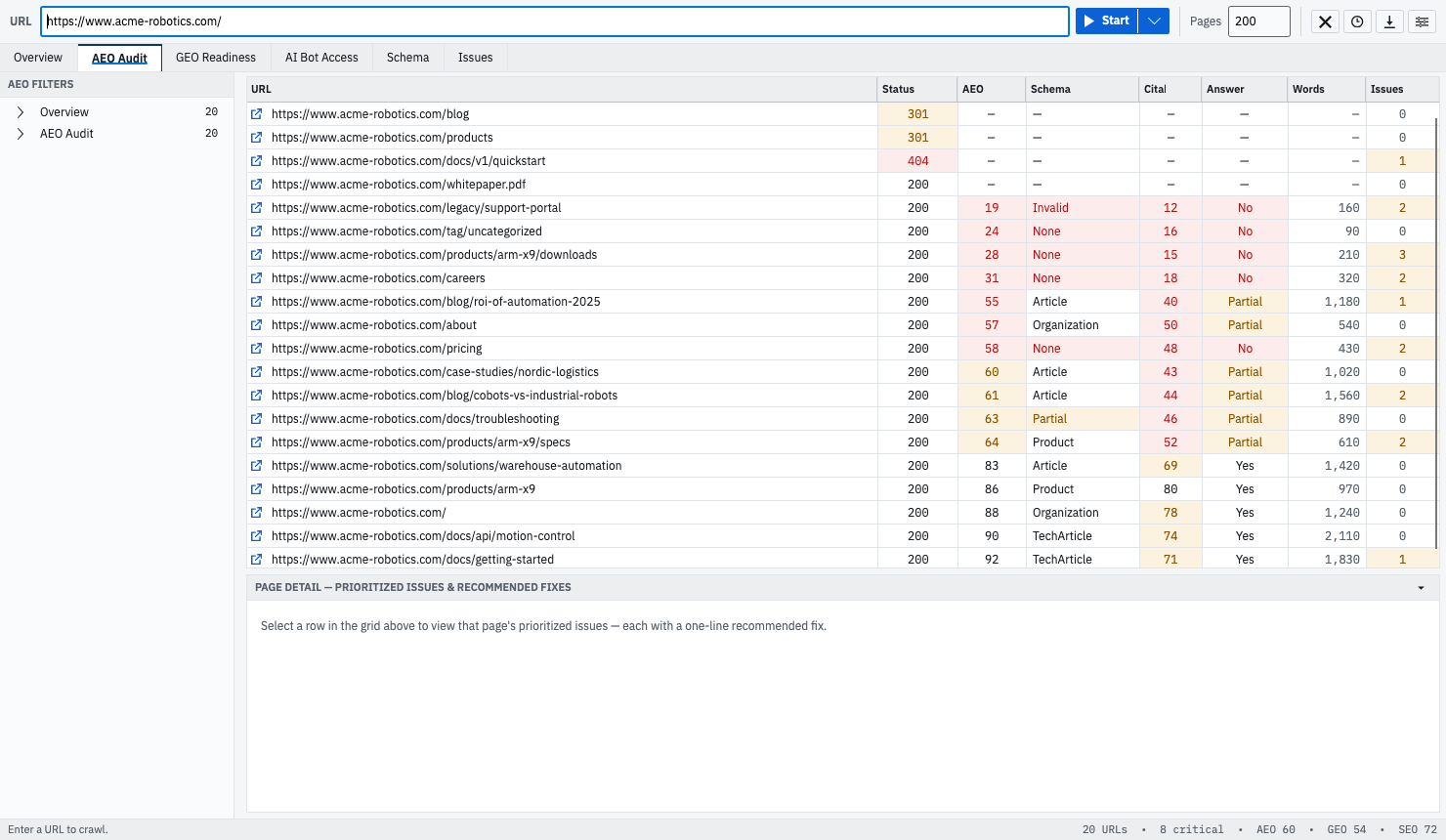
That per-URL, per-signal shape is what GEOBee produces — it crawls a site, scores every URL on the eight AEO signals above, and ranks findings so pages that matter surface above archive pages that don’t. The three lenses documents every check and weight behind the score; findings and fixes shows how a failing signal becomes a ranked item with the fix attached.
Frequently asked questions
Is AEO different from SEO?
Yes, but additive rather than separate. SEO optimizes for ranking a link in a list; AEO optimizes for having a passage extracted and shown as an answer. The foundation is shared, and Google states that “all existing SEO fundamentals continue to be worthwhile” for its AI features. What AEO adds is a set of requirements ranking algorithms were largely indifferent to: self-contained passages, an answer near the top of its section, and structure a machine can use as retrieval handles.
Does AEO require special markup, an llms.txt file, or new schema?
No. Google’s guidance states you don’t need to create new machine-readable files, AI text files, or markup to appear in AI Overviews or AI Mode, and that no special schema.org structured data is required. Publishing an llms.txt breaks nothing, but no major vendor documents consuming it and it grants no access. The markup that does help — Article, HowTo, Product, QAPage — helps by disambiguating what your page is, not by opting you into a feature.
How long should an answer block be?
Two to three sentences, roughly 40 to 60 words, in the first paragraph under the heading that asks the question. That window is a working heuristic rather than a published rule: Google says snippet length has no fixed value and is truncated to fit the device width. It satisfies two constraints — complete enough to stand alone, short enough to be quoted whole.
Do I still need FAQ schema?
Not for rich results — Google’s FAQ rich result stopped appearing on 7 May 2026, and reporting and testing support was withdrawn over the following months. FAQPage remains a valid type and Google doesn’t ask anyone to remove existing markup, so keep it if you have it. The reason to write question-and-answer content now is structural: a Q&A pair is a pre-chunked question and answer, useful to an extractor whether or not the markup is there.
Can a page be fully answer-ready and still never get cited?
Yes, and it’s the most important limit to hold onto. Answer-readiness makes a page extractable; it doesn’t make it the page an engine chooses. Retrieval is a competition decided by trust, competing coverage, freshness, and the exact phrasing of the question — none of which are properties of your HTML. Answer-readiness is worth doing because it’s the half you can verify and fix.
Three things to do this week
In order, on the pages you would most want an assistant to be able to answer from.
Read the first sentence under every heading on your five most valuable pages, headings included and nothing else. Fix every pair where the sentence doesn’t answer the heading. This is the 20-point signal and usually the cheapest edit in this guide.
Open those same pages in reader mode and confirm what’s left contains your actual answer. Then load one with JavaScript disabled and check the text is still there.
Crawl the site and sort the export by title, then by description, to find the duplicates — then check the meta robots column for any nosnippet or max-snippet directive nobody remembers adding. The first two mean no page is describing itself; the third can make a ranking page ineligible for the answer surfaces you’re trying to reach.
For the layer underneath all of this, AI crawler access covers whether the fetch happens at all. For the faults that survive a clean fetch and good structure, five things that keep a good page out of AI answers is the shortest route to the rest.