
The question has a narrower answer than it sounds like. An AI crawler does not extract “your page.” It extracts a text document derived from the bytes your server returned, and that document is smaller — usually much smaller — than what a person sees in a browser.
So the useful version of the question is: which specific parts of what you published end up in that document? That has a concrete answer, element by element, and for the standalone AI crawlers it differs from the answer for Googlebot in one way that changes what you should build.
Knowing the list is worth more than it sounds, because most of the expensive things on a page are on the discard side of it. Video, interactive components, carousels, and image-based infographics are the line items with real production budgets attached, and none of them are a text source. Before you commission another one for a page whose job is to answer a question, it is worth knowing what an answer engine will actually see.
This page is an inventory rather than a walkthrough. What an answer engine reads traces the pipeline in order, fetch to answer, and Answer Engine Optimization: a page-level guide covers what to do about it. What follows is just the list: what survives that trip, what never enters it, and what depends on which crawler showed up.
Key Takeaways
- AI crawlers extract text from the raw HTML response — main content, headings, list and table text, anchor text,
altattributes, title and meta, and JSON-LD. Almost nothing else on the page is a text source.- The major standalone AI crawlers do not execute JavaScript. A joint Vercel and MERJ analysis concluded that “none of the major AI crawlers currently render JavaScript,” across a network seeing 569 million GPTBot and 370 million Claude requests in a month (Vercel, 17 December 2024).
- Google’s snippet controls are element-level extraction controls. Google states that
nosnippetprevents content “being used as a direct input for AI Overviews and AI Mode” (Google Search Central, retrieved 2026-07-30).- Training crawlers and retrieval crawlers extract the same bytes.
robots.txtlets you separate their purpose, not what they read once allowed.
The short answer
AI crawlers extract the text of your main content out of the raw HTML your server returns: headings, paragraph text, the text inside lists and tables, link anchor text, image alt attributes, the title and meta description, and JSON-LD. They discard boilerplate. They do not run JavaScript, apply CSS, or read pixels.
Two constraints do most of the work there, and everything below is a consequence of one of them. The response body is the entire universe — if a string was not in the bytes returned, no amount of good writing puts it in the extracted document. And within that body, only one block is treated as content; the rest is recognized as chrome and dropped.
What a crawler actually requests
Before anything gets extracted, something gets requested, and the request mix tells you what these crawlers are built to consume. In the Vercel and MERJ analysis, HTML was the dominant request type for ChatGPT’s crawlers at 57.70% of fetches. For Claude’s, the largest single category was images, at 35.17%.
Both fetched JavaScript files — 11.50% of ChatGPT’s requests and 23.84% of Claude’s — and neither executed any of them (Vercel, 17 December 2024).
A crawler that downloads your bundle and never runs it is telling you what it is: an HTML-and-text consumer with a link parser attached. HTML is treated as the unit of measurement elsewhere too — Cloudflare’s published crawl-to-refer ratios count only requests where the response was Content-type: text/html (Cloudflare, retrieved 2026-07-30).
Worth noting before the inventory: a large share of those fetches extract nothing at all. The same analysis found 34.82% of ChatGPT’s fetches and 34.16% of Claude’s landing on 404s, against 8.22% for Googlebot. Your internal links and sitemaps are part of what determines whether a crawl produces any text.
The extract list
Here is the inventory, assuming a crawler that reached your page and got a 200. “Depends” means the answer varies by crawler or by your own configuration, and the sections after this one explain each case.
| Page element | Extracted? | Notes |
|---|---|---|
| Main content text | Yes | The core of the document. Everything else is context around it. |
| Headings, H1–H6 | Yes | Kept as structure, not decoration — they are the retrieval handles for the passage underneath. |
| List and table text | Yes | As text. Visual alignment is lost, so a column header like “Pro” means nothing unless a sentence nearby restates what is being compared. |
| Link anchor text | Yes | Both as words in place and as the crawler’s route to your next URL. |
Image alt attributes | Yes | It is text in the HTML, so it is read. The image itself is not. |
title and meta description | Yes | Parsed from head, independent of the body. |
| JSON-LD structured data | Yes | Parsed separately from the prose, then compared against it. |
| Text present but hidden with CSS | Usually | It was in the response body, so it is available to read. |
| Navigation, header, footer | No | Boilerplate — near-identical across your URLs, so recognized as chrome and dropped. |
| Cookie banners, newsletter forms, related-post rails | No | Same reason. Repetition across URLs is the signal. |
| CSS files and the layout they produce | No | Fetched sometimes, never a text source. |
| Text baked into an image | No | No OCR in the text path. A pricing table rendered as a screenshot is empty. |
| Content injected by JavaScript | No, for standalone AI crawlers | Not in the response body. See below for the Google exception. |
| Content fetched only on interaction | No | An accordion body or tab loaded on click was never in the response at all. |
Content inside an iframe | Depends | A separate URL needing its own fetch, its own robots.txt permission, and its own extraction. |
Text you excluded with data-nosnippet | No, on Google surfaces | A deliberate, element-level exclusion. |
The row that surprises people most is alt text. It is extracted, reliably, because it is a string in the markup — which makes it the only text channel an image has. If a diagram carries an argument your prose does not make, that argument exists for a crawler solely to the extent the alt attribute states it.
What never survives, and why
The three failure modes collapse into one question each: was it in the response, is it text, and is it content?
Not in the response. This is where JavaScript lands. The Vercel and MERJ analysis found that “none of the major AI crawlers currently render JavaScript,” naming OAI-SearchBot, ChatGPT-User, GPTBot, ClaudeBot, Meta-ExternalAgent, Bytespider, and PerplexityBot. Search Engine Land was still reporting the finding as current in April 2026, citing the same testing (Search Engine Land, 17 April 2026).
Two honest caveats on that, because it is the most consequential claim on this page. No vendor documents its rendering behavior — OpenAI’s, Anthropic’s, and Perplexity’s crawler pages describe purpose and robots.txt handling and say nothing about JavaScript. And the underlying measurement is from December 2024. It is the best available large-sample evidence, it is measured rather than declared, and it is old enough that you should confirm it against your own logs rather than take it on faith.
Google is the exception, and the reason is structural rather than generous. To appear in AI Overviews or AI Mode, Google states a page “must be indexed and eligible to be shown in Google Search with a snippet” (Google Search Central, retrieved 2026-07-30) — and rendering is a phase of getting indexed: Google processes JavaScript in three phases, crawling, rendering, and indexing, where “a headless Chromium renders the page and executes the JavaScript” (Google Search Central, retrieved 2026-07-30).
So client-rendered content can reach Google’s answer surfaces while staying invisible to GPTBot and ClaudeBot. A page that works in AI Overviews is not evidence that it works anywhere else — which makes Google the worst available proxy for testing whether your content is extractable.
Not text. Pixels, CSS, and video frames. alt, captions, and transcripts are the text channels for non-text media, and they are the whole of it.
Not content. Boilerplate, dropped by repetition. This is the one that shrinks a long page down to a few paragraphs: if your argument sits in a sidebar or a rail that also appears on dozens of other URLs, it looks like furniture.
The parts you can exclude on purpose
Extraction is not entirely something that happens to you. On Google’s surfaces, three directives operate at exactly this layer.
nosnippetsuppresses the text snippet, and Google states the rule will “prevent the content from being used as a direct input for AI Overviews and AI Mode.”max-snippet:[number]caps the characters used, and Google states it “will also limit how much of the content may be used as a direct input for AI Overviews and AI Mode.”data-nosnippetworks at the element level, letting you “designate textual parts of an HTML page not to be used as a snippet.” It is valid only onspan,div, andsectionelements — applied to anything else, it does nothing (Google Search Central, retrieved 2026-07-30).
Two things follow. First, data-nosnippet is the only tool here that operates below page level, which makes it the right instrument for a specific paragraph — a legal disclaimer, a syndicated quote — that you want indexed but not lifted.
Second, and more often missed: these are Google directives governing Google’s surfaces. They are not an industry-wide opt-out. OpenAI, Anthropic, and Perplexity all document honoring robots.txt, which is a URL-level instrument; none of them document honoring element-level snippet attributes. The practical shape is that you have a scalpel for one surface and a blunt instrument for the rest.
This cuts the other way too, which is the more common bug. A nosnippet inherited from a template, or a data-nosnippet wrapper left around a div that has since grown to hold the real content, silently removes that content from Google’s answer inputs. It is worth grepping your templates for both strings and confirming each one is still wrapping what it was written to wrap.
Training crawlers and retrieval crawlers extract the same bytes
A common assumption is that a training crawler reads a page differently from a search crawler. It does not. The distinction is purpose and your control surface, not extraction behavior.
| Agent | Operator | Stated purpose | robots.txt |
|---|---|---|---|
GPTBot | OpenAI | ”crawl content that may be used in training our generative AI foundation models” | Honored |
OAI-SearchBot | OpenAI | ”surface websites in search results in ChatGPT’s search features” | Honored |
ChatGPT-User | OpenAI | ”certain user actions in ChatGPT and Custom GPTs” — “not used for crawling the web in an automatic fashion” | User-initiated |
ClaudeBot | Anthropic | ”collecting web content that could potentially contribute to their training” | Honored |
Claude-SearchBot | Anthropic | ”analyzes online content specifically to enhance the relevance and accuracy of search responses” | Honored |
Claude-User | Anthropic | ”supports Claude AI users… it may access websites” | User-initiated |
PerplexityBot | Perplexity | ”surface and link websites in search results on Perplexity. It is not used to crawl content for AI foundation models” | Honored |
Perplexity-User | Perplexity | ”supports user actions within Perplexity" | "Generally ignores robots.txt rules” |
Google-Extended | Not a crawler — “a standalone product token that web publishers can use to manage whether content Google crawls from their sites may be used for training” | Control token only |
Sources, all retrieved 2026-07-30: OpenAI, Anthropic, Perplexity, Google.
Two rows deserve attention. Google-Extended is not an agent that fetches anything — blocking it changes training eligibility, not crawling, and it will never appear in your logs. And the user-initiated fetchers are a real gap in the model: Perplexity documents that Perplexity-User “generally ignores robots.txt rules” because a person asked for the page. A robots.txt block is not a guarantee that nothing reads the URL. GPTBot, OAI-SearchBot, ClaudeBot, PerplexityBot: which is which works through each agent and what blocking it costs, and AI crawler access covers the access layer that gates all of this.
Seeing exactly what gets extracted from one of your pages
Do this by hand once on your highest-value URL. It takes about ten minutes and it makes the rest of the inventory concrete.
1. Look at what the crawler looks at. You do not need a terminal for this. In any browser, put view-source: in front of your URL — view-source:https://example.com/your-page/ — and you are reading the raw HTML your server returned, before any JavaScript ran. That is the same document a non-rendering crawler receives. Now use the browser’s find on the sentence you most want extracted. If it is not in there, no standalone AI crawler has it, and no writing change will fix that — it is a rendering problem.
Two things to keep straight while you do this. View-source shows the response, not the rendered page, which is exactly why it is the right view — the developer tools’ Elements panel shows the DOM after JavaScript, and will happily show you content the crawler never received. And a page whose text only appears after a script runs will look alarmingly empty here; that is the finding, not a mistake.
From a terminal, the equivalent request is one line:
curl -sA 'GPTBot/1.4 (+https://openai.com/gptbot)' \
  https://example.com/your-page/ > fetched.html
2. Strip the boilerplate yourself. Working from either view, mentally delete the header, the footer, and every block that also appears on ten other URLs. What remains is approximately the block that gets kept. If your actual answer is not in the remainder, the extractor does not have it either.
3. Read each ## section alone. Cover everything else on screen. If a section’s first sentence does not answer its own heading, there is nothing clean to lift from it. Five things that keep a good page out of AI answers covers the failure modes this surfaces most often.
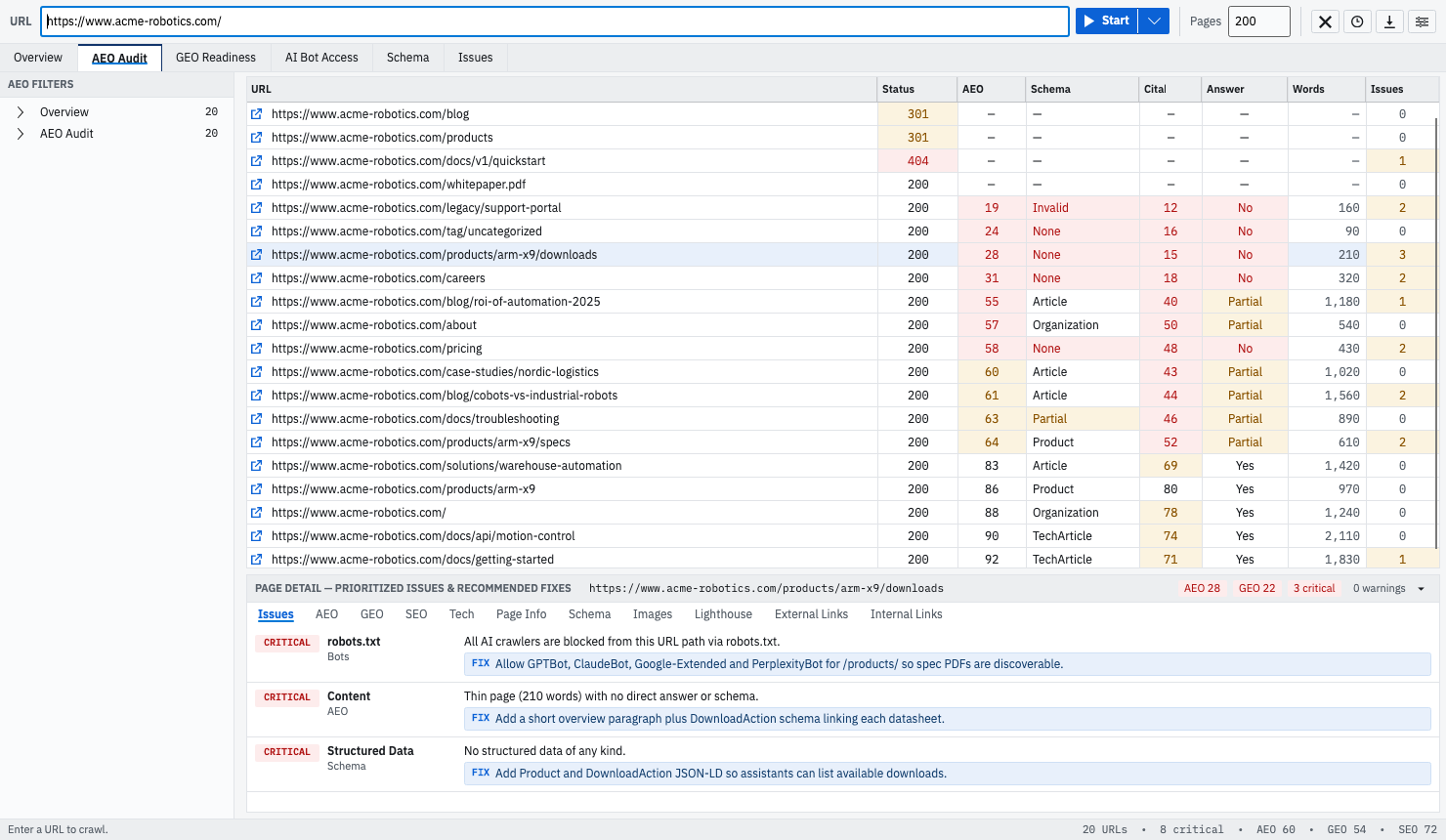
That method does not scale past a handful of URLs, which is the point at which GEOBee is useful. It fetches without executing JavaScript — the same view the crawlers get — and its Page Info tab lists every heading it pulled from the page, H1 through H6, in document order. The Issues tab ranks what is missing and pairs each finding with a fix.
None of this predicts a citation, and it is worth being exact about that. What survives extraction is a property of your HTML that you can verify and change. Whether an assistant then chooses your passage over someone else’s depends on competition, authority, and the question asked — none of which live on your page. Extraction is the half you control.
Frequently asked questions
Do AI crawlers read text inside images?
No. There is no OCR in the text extraction path, so a diagram’s labels or a pricing table rendered as a screenshot contribute nothing. The alt attribute is extracted, because it is text in the HTML, and it is the only text channel the image has.
Does content behind a tab or accordion get extracted?
It depends on where the content lives, not on whether the reader clicks. If the text ships in the HTML response and is merely hidden with CSS, it is available to read. If it is fetched from the server only when someone clicks, it was never in the response and no crawler sees it. The test is view-source, not the rendered page.
Do AI crawlers extract JSON-LD?
Yes, and separately from the prose, which is why disagreement between the two is worse than having no markup. Structured data that matches the visible page is a second independent statement of the same fact. Structured data that contradicts it leaves a system holding two claims and no way to choose.
Can I stop one paragraph being extracted without blocking the page?
On Google’s surfaces, yes — wrap it in a span, div, or section carrying data-nosnippet. For OpenAI, Anthropic, and Perplexity there is no documented equivalent; their published control is robots.txt, which works at URL level. Partial exclusion is currently a Google-only capability.
If you want the whole extraction picture across a site rather than one URL at a time, that is what GEOBee does: it crawls without running JavaScript, scores every URL on the signals above, and ranks what to fix first. The three lenses documents every check and its weight; findings and fixes shows how those checks become a ranked list with a fix attached to each one.