
Most of what’s on a page never gets read by an AI system the way it gets read by a person. A browser downloads everything — the nav, the footer, the cookie banner, the paragraphs you actually wrote — and renders it as one continuous page. An extraction pipeline does something closer to demolition: it pulls the page apart, discards most of it, and keeps a document that’s a fraction of the size of what you published.
This isn’t about whether your content is good — assume it is. It’s about what happens to good content between the moment a crawler fetches your HTML and the moment a sentence from it turns up, quoted or paraphrased, in an answer. That gap is where most AEO surprises live, not the writing itself.
It’s also the explanation for a result that otherwise looks like bad luck: a page that took a month to produce, ranks where it should, and never gets quoted. Usually nothing is wrong with it. Something between the fetch and the answer discarded the part you cared about, and the sections below are the list of things that do the discarding.
The page gets flattened before anything reads it
Before an extractor decides anything is worth keeping, it has to decide what counts as the page. That means stripping boilerplate — the parts that are identical, or nearly identical, across every URL on your site. Navigation menus go. Footers go. Cookie notices, newsletter forms, “related articles” rails, comment sections — all of it gets recognized as chrome around the content rather than the content itself, and discarded.
What’s left is usually one block: the main article or product description, structurally isolated from everything around it. Headings inside that block survive, because they’re structure, not decoration — an extractor keeps them as the skeleton it hangs everything else on. But the block itself is often smaller than what you’d see scrolling the live page. If your actual argument lives in a sidebar, an expandable FAQ widget, or a tab that isn’t the default, there’s a real chance it never makes it into the block that gets kept at all.
This is worth checking directly rather than assuming. Load your page, then imagine deleting the header, footer, and any widget that also appears on ten other pages on your site. What’s left is roughly what an extractor sees. If that remainder doesn’t contain your actual answer, the extractor doesn’t have it either.
Headings are the index, not decoration
Once the boilerplate is gone, headings become the map of what’s left. An extractor doesn’t read a page top to bottom the way a person skimming might; it uses headings as retrieval handles for the passage sitting underneath. A heading phrased as a question is doing real work — it tells the extractor “the next few sentences answer this,” and if they do, cleanly, that pair gets lifted whole.
The failure mode here is common and easy to miss, because it reads fine to a person. A heading asks “How long does a full crawl take?” and the paragraph underneath opens with two sentences on why crawl time matters before it gets to a number. A human reader tolerates that. An extractor scoring the passage against the heading doesn’t: the first sentence never answered the question.
Passages need to stand alone
Extraction generally works on chunks — a heading and the paragraph or two beneath it, not the whole page at once. Each chunk has to make sense without the ones around it, and a lot of well-edited prose fails that test without ever looking broken to a human reader.
Pronouns are the most common offender. “It handles this automatically” reads fine three sentences after you’ve introduced what “it” is; pulled out as a standalone chunk, “it” refers to nothing. The same problem shows up with “as mentioned above” and “the table below” — both assume the reader has the rest of the page for context, which chunked extraction doesn’t preserve. A table with headers like “Standard / Pro / Enterprise” is unreadable as a chunk unless the surrounding sentence restates what’s being compared.
None of this means cutting pronouns altogether — that would make the prose worse for someone reading the whole page. It means checking your highest-value sections specifically: read each ## block on its own, as if it were the only thing on the page, and see whether it still says something.
Structured data has to agree with the visible text
A lot of pages carry JSON-LD schema markup that nobody but a machine reads, and it’s easy to let that drift out of sync with the text a person sees — a price that changed on the page but not in the schema, a name updated in one place and not the other.
That drift matters more than having no markup at all. Structured data that agrees with the visible page is a confirmation signal — two independent sources stating the same fact. Structured data that contradicts the visible page is worse than silence, because a system now holds two conflicting claims about the same fact with no clean way to decide which one to trust. The documented consequence is blunter than a soft penalty. Google’s structured data guidelines tell you not to mark up content that isn’t visible on the page, and a site caught doing it can receive a manual action that makes it ineligible for rich results — not just for the field that disagreed, and not just on that page. Five things that keep a good page out of AI answers has a way to catch that drift before Google does.
What never makes the trip
Some content simply doesn’t survive the fetch, regardless of how well it’s written. Text baked into an image — a diagram with labels, a pricing table rendered as a screenshot — is invisible to a system parsing HTML and text nodes rather than running OCR on every asset. Content that is genuinely injected on interaction — an accordion whose body is fetched only when you click it, a tab that renders on demand — never reaches an extractor, because it was never in the response. Content that ships in the HTML and is merely hidden with CSS is a different case: it is there to be read, and search engines have said for years that they read it. The question is not whether the reader has to click. It is whether the bytes were in the response.
Content that depends on client-side JavaScript is a slower version of the same problem: some extraction pipelines execute JavaScript and some don’t, so content that only exists after a script runs is present for some readers and absent for others. Any extracted document also has a practical limit — content far down a long page, past the pipeline’s cutoff, may never get evaluated even though it rendered fine in a browser.
Seeing it on your own pages
Open any URL on your own site and check the two things above: what survives boilerplate stripping, and whether each section’s first sentence answers its heading.
In GEOBee, a Page Info tab lists every heading it pulled out of the page, H1 through H6, in document order. An Issues tab ranks what is missing — no direct answer near the top, no structured data, AI crawlers blocked at robots.txt — and pairs each finding with the fix it recommends.
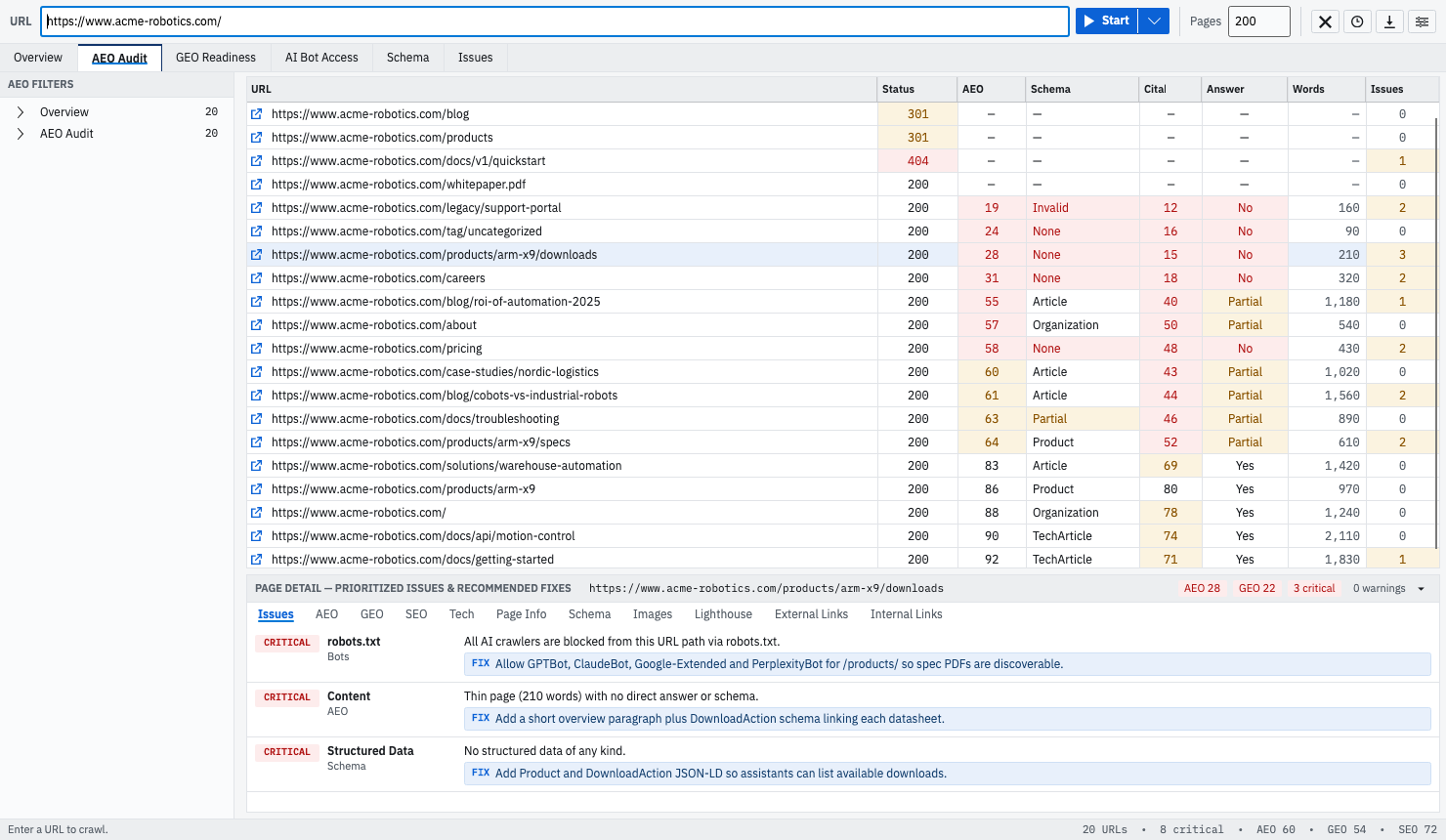
The three lenses walks through every check behind the three scores. Findings & fixes shows how those checks turn into a ranked list with a fix attached to each one.